Cursor Auto is changing tomorrow: the model it picks may decide what you pay
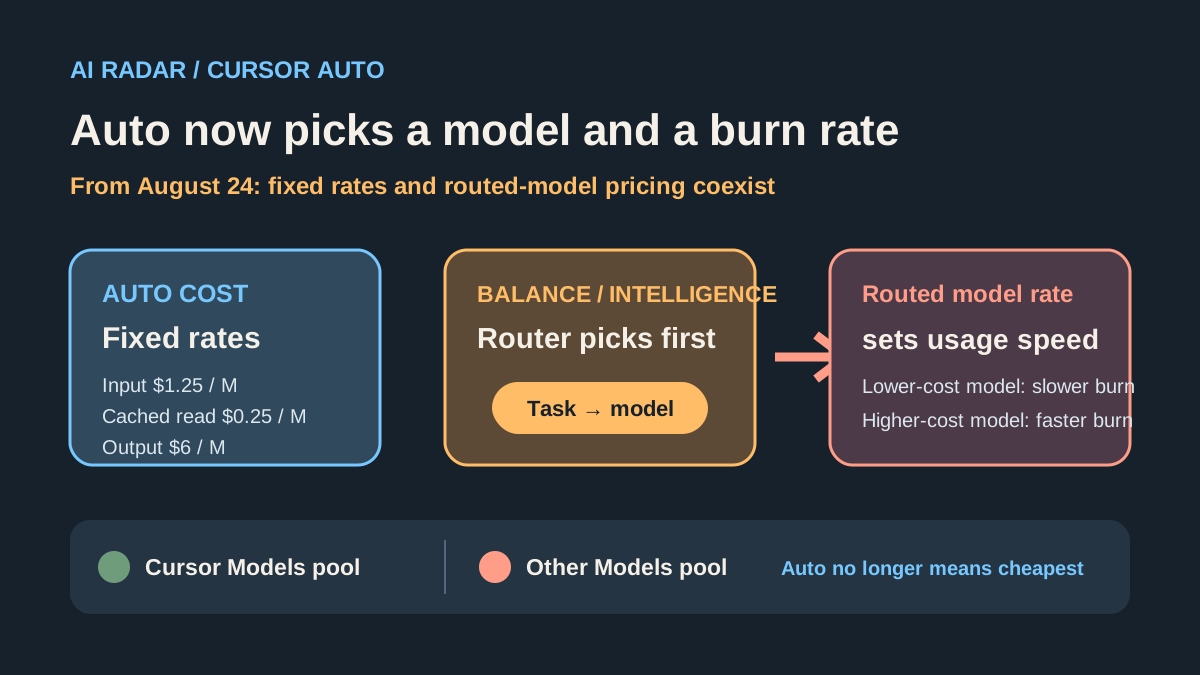
Starting August 24, 2026, Cursor will separate Auto billing more clearly: Auto Cost keeps fixed per-million-token rates, while Auto Balance and Auto Intelligence charge at the API rate of the model actually routed. Cursor is also increasing included usage for Cursor Models; the Pro, Pro Plus and Ultra plans show roughly $20, $70 and $400 of Other Models usage respectively. This is not simply an Auto price hike, but Auto is no longer automatically the cheapest option. Heavy users should watch the routed model, the two usage pools and the cost per successful task.
Bottom line
If you use Cursor and click Auto whenever you are unsure which model to choose, this week is a good time to inspect the settings and Usage Dashboard.
Cursor now documents three Auto modes: Auto Cost, Auto Balance and Auto Intelligence. Auto Cost keeps fixed pricing of $1.25 per million input tokens, $0.25 per million cached-read tokens and $6 per million output tokens. Auto Balance and Auto Intelligence charge at the API price of the model actually routed. Cursor is also increasing included usage for Cursor Models, so this is not a simple “Cursor raises Auto prices” story.
My view: Auto is still useful, but stop treating it as the cheapest safety box. From August 24, it is closer to handing the Router a combined decision about capability, speed and cost.
What changes on August 24
Cursor’s user notice puts the change in Auto routing and billing. The official Models & Pricing documentation now lists three modes:
- Auto Cost: a fixed per-million-token rate regardless of the model used behind the scenes;
- Auto Balance: priced at the API rate of the model actually used;
- Auto Intelligence: also priced at the API rate of the model actually used.
Third-party models draw from the Other Models pool. Cursor Models are a separate pool that includes Cursor Grok 4.6, Grok 4.5 and Composer 2.5. The pools reset with the monthly billing cycle, so “I still have plenty of Cursor Models usage” does not automatically mean you have plenty of Claude or GPT usage.
Auto Cost is predictable
Cursor lists these Auto Cost rates:
- Input: $1.25 per million tokens;
- Cached reads: $0.25 per million tokens;
- Output: $6 per million tokens.
The logic is straightforward: choose Auto Cost and the rate does not jump around with the model chosen behind the scenes. For small fixes, formatting, type cleanup and narrow code tasks, that predictability may matter more than Router cleverness.
Balance and Intelligence bring model prices into the decision
Cursor says Auto Balance and Auto Intelligence use the actual model’s API rate. Auto therefore selects a model and influences how quickly a task consumes the relevant usage pool.
Cursor’s public table lists different tiers including GPT-5.6 Luna, GPT-5.6 Terra, GPT-5.6 Sol, Grok 4.6, Composer 2.5 and Claude Fable 5. Do not multiply a model’s list price by total tokens and call that your final bill: caching, input-output mix, context length, retries and completion rate all change the result. But the routed model does affect how quickly usage is consumed.
That is the boundary behind the headline “the model it picks may decide what you pay.” It describes the billing rule and consumption direction, not a promise that every task ends at the model’s public API bill.
Cursor is also adding included usage
Cursor separates usage into two pools. The current docs list Pro at $20 per month, Pro Plus at $60 and Ultra at $200; included Other Models usage is about $20, $70 and $400 respectively. The Cursor Models pool provides substantially more included usage for Cursor Grok 4.6, Grok 4.5 and Composer 2.5.
So “Cursor raises Auto prices” is incomplete. The more accurate story is that Cursor is giving its own models more room while making third-party model costs show up more explicitly in usage.
Why coding agents amplify the difference
A normal chat request may use a few thousand tokens. A coding agent working in a real repository reads code, searches references, plans, edits, runs tests, handles errors and reads context again. A single task can consume millions of tokens or more.
Model price differences can therefore repeat across many tool calls. A cheap model that edits the wrong thing several times and then needs a stronger model to finish may not be cheaper than starting with the stronger model. Conversely, sending a simple task to a frontier model wastes usage.
I would watch one metric: the cost of each successfully completed task, not only the price per million output tokens.
Two community signals are worth recording
One Cursor user wrote on Reddit that their workflow had not meaningfully changed, but after the August quota reset they used 100% of their premium model API token allowance in three days. The post was made before the August 24 change. Routing, context, token accounting or task changes could explain it, so it cannot prove the new billing caused the anomaly.
Another heavy user said they had used about 2.3 billion tokens in a month on the $60 plan, mostly through Auto. They worried that charging everything at third-party API rates would make the cost unmanageable. This is a self-reported total and a question, not an invoice, and it cannot be converted directly into a multi-thousand-dollar bill.
The value of these posts is the warning: Agent users can no longer infer what they spent from one total-token number. After August 24, Usage Dashboard data from similar workloads will be much stronger evidence.
How I would choose
If budget predictability matters most, start with Auto Cost, then use Composer 2.5 or Grok 4.6 for simple work. “Cheaper” here is not a guarantee of quality; it is a more predictable consumption pattern.
If complex-task completion matters most, try Auto Intelligence or select a stronger model directly, while accepting faster usage consumption.
For CSS tweaks, copy edits, a small function or type cleanup, there is little reason to let the Router escalate to the most expensive model. For large refactors, cross-file architecture changes and hard-to-reproduce bugs, include rework in the cost calculation.
I would run a small A/B test: take three tasks you actually do, run them through Auto Cost, Composer/Grok and your usual Auto mode, then record completion, rework rounds, time, input-output tokens and pool usage. Three real tasks will tell you more than a model-price table.
What to watch next
- The real routing mix of Auto Balance and Auto Intelligence after August 24;
- whether Usage Dashboard clearly shows the model and usage pool for each task;
- whether average consumption rises on the same repository and similar tasks;
- the successful-task cost gap between Composer, Grok and third-party frontier models;
- whether Cursor adds routing explanations, budget caps or model-scope controls.
FAQ
Is Cursor uniformly raising Auto prices on August 24?
Not exactly. Auto Cost remains fixed, Auto Balance and Auto Intelligence use the routed model’s API rate, and Cursor is also increasing included usage for its own Cursor Models.
Which Auto mode should I use?
Choose Auto Cost when predictability matters. Try Auto Balance when you want a middle ground. Use Auto Intelligence when complex-task capability matters more, while monitoring usage.
Does the Reddit three-day quota report prove a policy problem?
No. It predates the August 24 change and is a community report with multiple possible causes. It is worth tracking, not proof of causation.
Our judgment
Cursor is not simply making Auto more expensive. It is tying automatic model selection more tightly to how much a task consumes. It is adding room for Cursor Models while making third-party model pricing show up more clearly in usage.
For most users, the practical move is not to cancel today. Open the Usage Dashboard, stop assuming Auto means cheapest, and measure your own cost per successful task with a few real workloads.