ChatGPT can now read your iMessages: useful replies, uncomfortable permissions
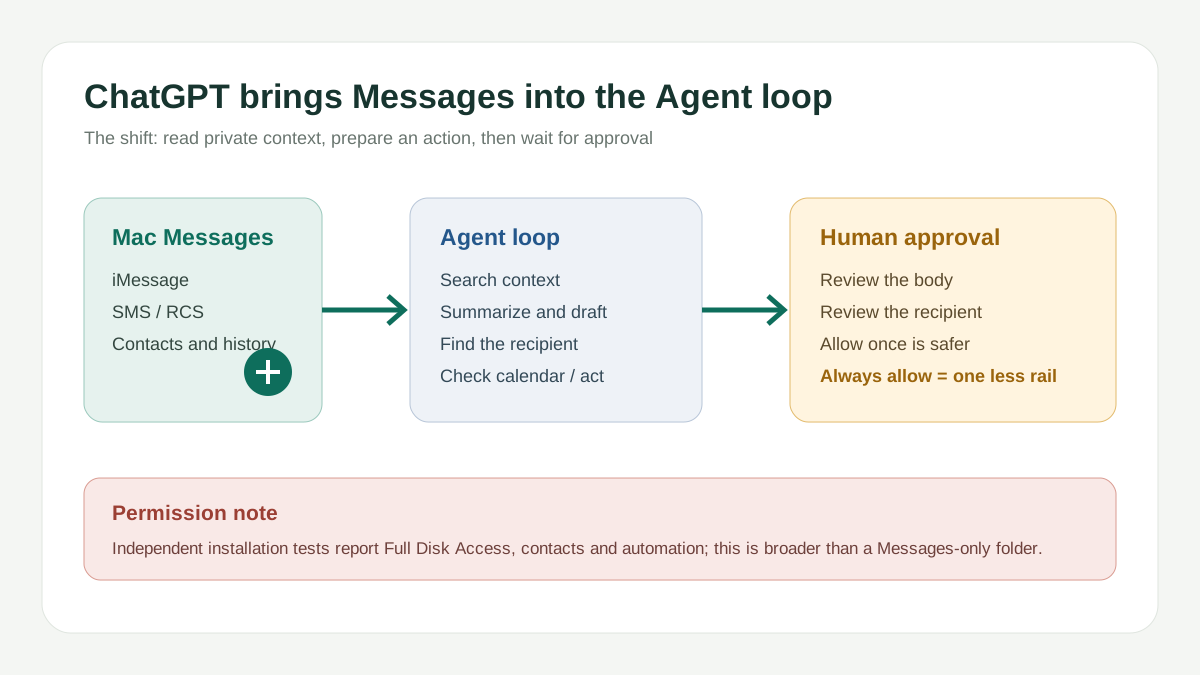
OpenAI has launched an Apple Messages plugin in the ChatGPT macOS desktop app. It is available on all plans, but this release works only in the Apple Silicon build and only in Codex and ChatGPT Work. It can search and read iMessage, SMS and RCS chats, prepare replies, and send them. By default it asks you to approve the message and recipient, while OpenAI warns that per-chat Always allow sending removes the final review. Independent installation tests also report Full Disk Access, contacts and automation permissions, so the sensible starting point is search, summaries and drafts, not unrestricted sending.
Bottom line
OpenAI launched the Apple Messages plugin on August 20, 2026. On an Apple Silicon Mac, the ChatGPT desktop app makes it available on all plans; in Codex and ChatGPT Work it can search and read iMessage, SMS and RCS, analyze conversations, prepare replies, and send them through the Mac Messages app.
I would try its search, summaries and drafts, but I would not start with persistent sending. OpenAI requires review of the message and recipient by default and explicitly warns that Always allow sending removes that final check. Independent installation testing also reported Full Disk Access, contacts and automation permissions. The risk is not proven spying by OpenAI. It is that a private Agent receives a local entry point broader than a single chat folder.
What happened
OpenAI describes this as an Apple Messages plugin, not a feature inside an ordinary ChatGPT conversation. The flow is: install Apple Messages from Plugins, start a new Codex or ChatGPT Work chat, then ask it to find, summarize, draft or send a message. The official examples include searching old chats, finding people who need follow-up, analyzing conversations, and preparing or sending replies.
There are clear boundaries. The release is only in the Apple Silicon build of the ChatGPT macOS desktop app. It does not work in regular ChatGPT chats, ChatGPT on the web or mobile, Codex CLI, or the IDE extension. A headline saying “ChatGPT takes over your iPhone texts” would overstate the product.
This is more than drafting one reply
Older chat assistants usually gave you text while you still had to copy it, find the person, paste it and send it. Apple Messages moves one step further: it can search months of conversation, use context to prepare a reply, locate the recipient, and then request approval to send.
Practical examples include:
- finding people who messaged yesterday but still need a follow-up;
- locating birthdays, agreed times or customer requests in old conversations;
- summarizing a long group chat and drafting a reply for review;
- preparing an administrative response such as which times are open next week.
That is the difference between an Agent and a chatbot: it begins to complete cross-application work instead of only explaining the next step.
The permission is bigger than “connecting a chat plugin”
OpenAI’s documentation says macOS permissions are needed before the plugin can read Messages. MacRumors’ installation test additionally reported Full Disk Access, contact names and automation tools.
Full Disk Access does not mean “allow only iMessage.” It is a high-privilege macOS entry point with a scope broader than Messages itself. That fact does not prove OpenAI is abusing the permission, nor does it prove every message is uploaded. It means the permission scope and the benefit should be evaluated together.
The more accurate question is: to let an Agent find one old message, am I willing to give it a high-privilege local entry point that can operate Messages? On a computer containing customer quotes, contracts, verification codes and private relationships, this is not a switch to enable by reflex.
There is a default safety rail, but you can remove it
By default, OpenAI says sending requires approval of both the message body and the recipient. You can allow only that send, or choose Always allow sending for a particular chat. The latter means ChatGPT can send future messages to that Messages chat without asking each time.
OpenAI explicitly warns that persistent approval removes the final chance to review a message before it is sent. It recommends per-send approval when a chat may contain untrusted or misleading instructions. The docs also note that Full access, or otherwise disabling approval prompts, can prevent Apple Messages from showing the confirmation needed to send.
This warning matters more than the phrase “AI can send texts.” Code can be reset. A message sent to the wrong person, or a private context inserted into a customer reply, does not have the same easy undo.
The debate is also about who “said” the message
Business Insider documented two reactions after launch. Some people saw a real personal assistant that could find birthdays, summarize chats and prepare follow-ups. Others felt that having ChatGPT write private messages changes the authenticity of the exchange. The report quoted one user saying they might stop talking to someone who used AI to text on their behalf.
I expect a boundary to form quickly. Information transfer, scheduling, attachment confirmations and order follow-ups are good Agent drafts. Apologies, comfort, declarations of affection, conflict and major decisions are harder to outsource to a single Approve button.
What it suggests for work teams
Apple Messages is only one entry point. The same pattern connected to email, WhatsApp, a CRM or an inquiry system becomes: find unanswered customers, read past quotes, and prepare the next follow-up. That administrative automation is attractive for sales and export teams, but customer records, contracts and personal information enter the Agent’s permission boundary too.
Enterprise users also need to check whether administrators permit this Computer Use capability. OpenAI’s documentation says managed workspace administrators can disable Apple Messages through the existing Computer Use control.
How I would test it
Start with search, summaries and drafts. Do not grant persistent sending. Then use a low-sensitivity set of conversations and check whether it identifies the right person, separates group chats from contacts, and avoids pulling old context into a new reply. Only after that would I consider per-chat sending approval.
If the machine contains customer privacy, company contracts, verification codes or regulated data, check the organization’s endpoint policy first. Full Disk Access should not remain enabled when the plugin is not needed.
What to watch next
- Whether OpenAI publishes clearer details about local processing, retention and logs;
- whether the plugin reliably separates iMessage, SMS, RCS, group chats and contacts with the same name;
- whether persistent sending produces more mis-sends, prompt-injection or social-engineering cases;
- whether Apple Messages expands to Intel Macs, the web, mobile, CLI or IDE surfaces;
- whether users treat AI-written private messages as rude and establish a new communication norm.
FAQ
Can ChatGPT now read my iPhone directly?
That is too broad. The official release is a Mac Messages plugin, available in Codex and ChatGPT Work on the Apple Silicon ChatGPT desktop app.
Is Full Disk Access an official OpenAI requirement?
OpenAI says macOS permissions are required, but the specific Full Disk Access observation comes from MacRumors’ independent installation test. It should not be presented as OpenAI’s complete official explanation of the permission scope.
Should I enable Always allow sending?
I would not start there. OpenAI says persistent approval removes the final review before sending, so keep per-send approval while testing.
Our judgment
The Apple Messages plugin matters less because AI can send a text than because it puts private communication into an Agent loop: search history, understand context, find the person, prepare an action, then wait for approval. It is beginning to look like a personal assistant, but permissions, mis-sends and communication authenticity arrive with the convenience.
It is worth a small, low-sensitivity trial for search, summaries and drafts. It is not worth surrendering persistent sending and a high-privilege local entry point just to remove one approval click.